Using the Keyword Tool to get keyword and ad group ideas Need help thinking of keywords or ad groups to add to your campaigns? Let the K...
Using the Keyword Tool to get keyword and ad group ideas
Need help thinking of keywords or ad groups to add to your campaigns? Let the Keyword Tool do the work for you. When you enter words or phrases that are related to your product or service in the Keyword Tool, you'll see keyword ideas and ad group ideas that are related to your terms. Then, you can get more keyword and ad group ideas that are similar to the results you like. You can also see performance statistics for your keyword and ad group ideas, download your ideas, or add them to an existing campaign.
Why use the Keyword Tool
The Keyword Tool can help you find keyword and ad group ideas that you might not think of while creating your campaigns. Here are some other ways the Keyword Tool can help you build effective keyword lists for your Search Network campaigns:- Create new ad groups: Get themed ad group ideas that are related to your product or service. For example, if you search on dark chocolate, you might see an idea for a dark chocolate bar ad group that includes such keywords as dark chocolate candy bars and organic dark chocolate bars.
- Start broad and then get specific: Use the Keyword Tool to experiment with broad keywords, and then you can try more specific keywords. For example, you might want to start searching on the keyword chocolate, and then more specific keywords such as dark chocolate or sugar free chocolate. The more you experiment, the more keyword and ad group ideas you'll have for improving your campaigns.
- Identify negative keywords: When you search for keyword ideas, you might see keywords that don't really apply to your business. You can add these terms to your ad group as negative keywords to prevent your ad from showing when people search for them. For example, if you sell dark chocolate candy and search on the keyword dark chocolate, you might see the related term dark chocolate cake recipe. You'll want to add that term as a negative keyword to prevent your ad from showing to people who search for dark chocolate cake recipe.
- Find keywords and ad groups based on your site content: You can enter the URL of your business website, or any site related to your business. Then, our system will scan your pages and give you relevant keyword and ad group ideas.
- Specify a language and location: You can refine your keyword and ad group results to a particular location and language. If you happen to be targeting French speakers who live in Switzerland, you can set the Keyword Tool to that language and location.
Tip
As you search for keyword ideas and ad group ideas, follow our tips on how to build the best keyword list.
How to Choose the Right Keywords
Learn how to select keywords that get your ads in front of thousands of potential customers. Get tips on creating keyword lists; find out how negative keywords can help you reach the right audience and how to discover new keywords with the Keyword Tool. Visit Learn with Google for a worksheet that will help you select relevant keywords for your online ads. Download it at google.com/ads/learn/keywordsforadwords
How to use the Keyword Tool
To get started with the Keyword Tool, enter a word or phrase that's related to your products or services. You'll then be able to see your individual keyword ideas as a list or grouped into themed ad groups.Here's how to use the Keyword Tool:
- Sign in to your AdWords account at https://adwords.google.com

- Click the Tools and Analysis drop-down menu and select Keyword Tool.
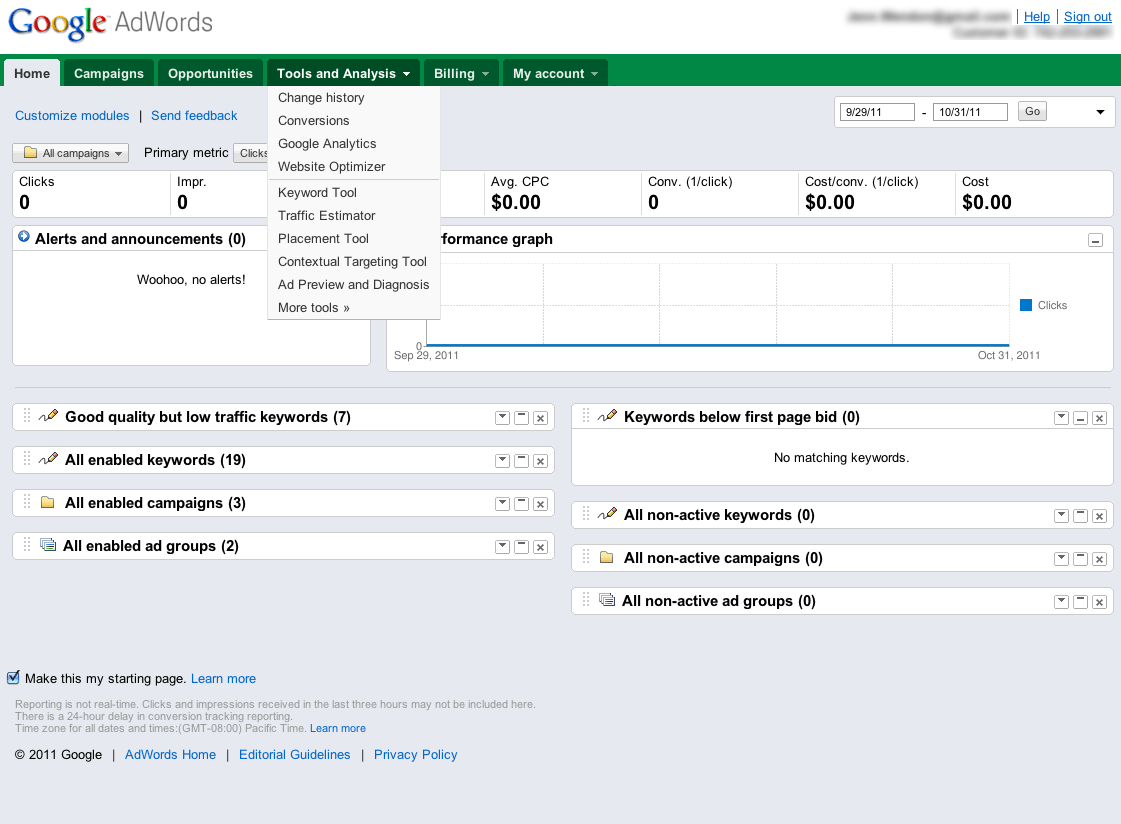
Keyword Tool
Using the Keyword Tool to get ideas - Enter a word or phrase, or a website's address, in the different sections of the box. To get more specific ideas, select a relevant category from the drop-down menu, or start typing the name of a category, and the menu will appear. If you don't select a category, you'll search across all categories. To filter large sets of ideas, enter both a word or phrase and a website URL.
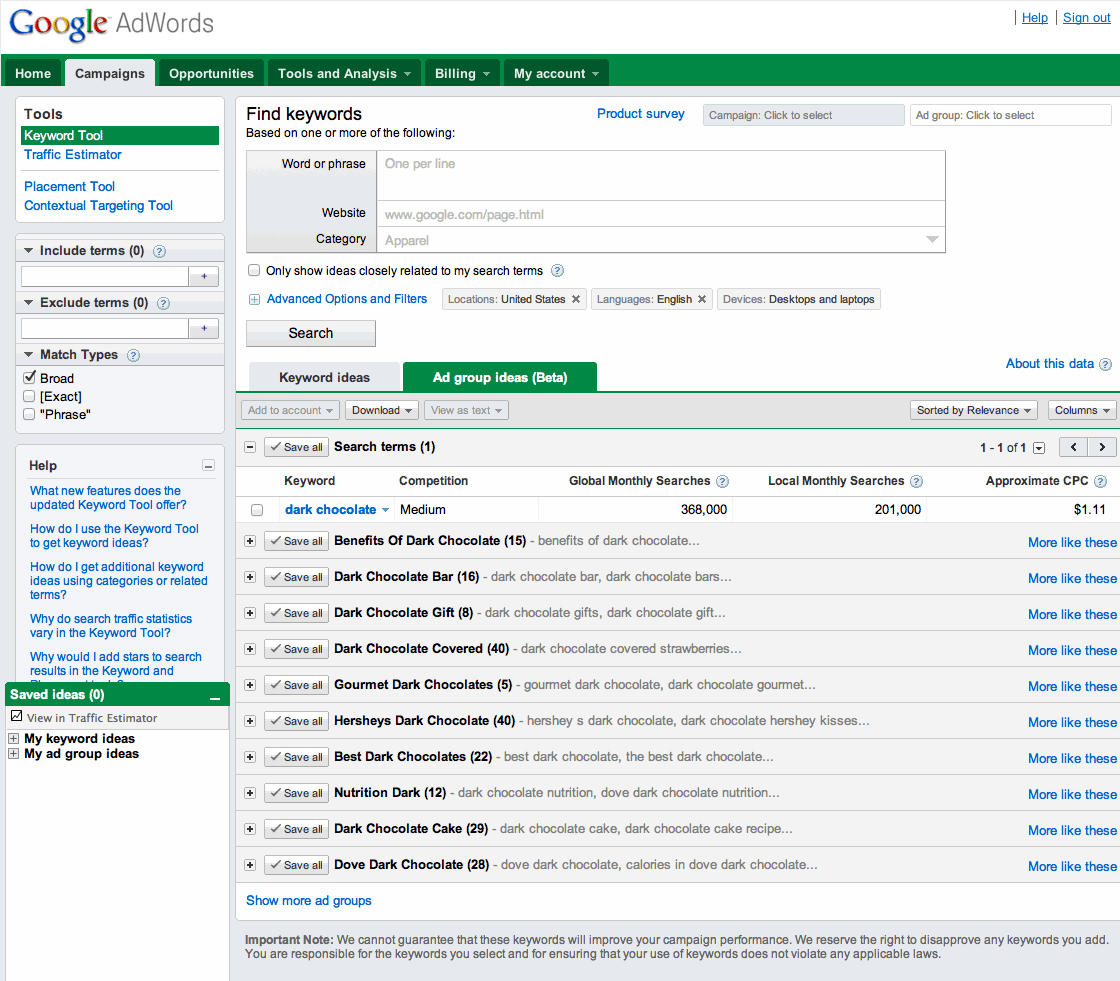
Keyword Tool
See how to search for ideas - Click Search. Your results will appear in the table.
Tips
- To search for ideas using the targeting settings from an existing campaign and ad group, select the campaign and ad group from the Campaign and Ad group boxes at the top of your browser. For example, if you choose your Chocolate campaign and dark chocolate ad group, you'll see ideas for English speakers in the United States since those are the language and location targets for that campaign. We'll also take the negative keywords in your campaign or ad group into account, which means we won't show you ideas with any of those negative keywords.
- Select the checkbox next to "Only show ideas closely related to my search terms" to see only results that include your original search terms.
- If you're targeting a city or state, only the targeted country will be reflected. You can change your country and language settings to see different statistics and compare potential keywords.
We recommend using the Ad Group Ideas tab so you can easily see your keywords grouped into themes and then add the ideas you like directly to your account.
Here's how to use the Ad Groups Ideas tab:
Here's how to use the Ad Groups Ideas tab:
- Click the Ad Group Ideas tab if you're not already on it. You'll see a list of ad groups.
- To see the individual keywords in an ad group, click the + button that's next to the name of the ad group. When you expand an ad group, you'll see a list of keywords and statistics for each one. You can decide which ad groups you'd like to add to your account based on those statistics.
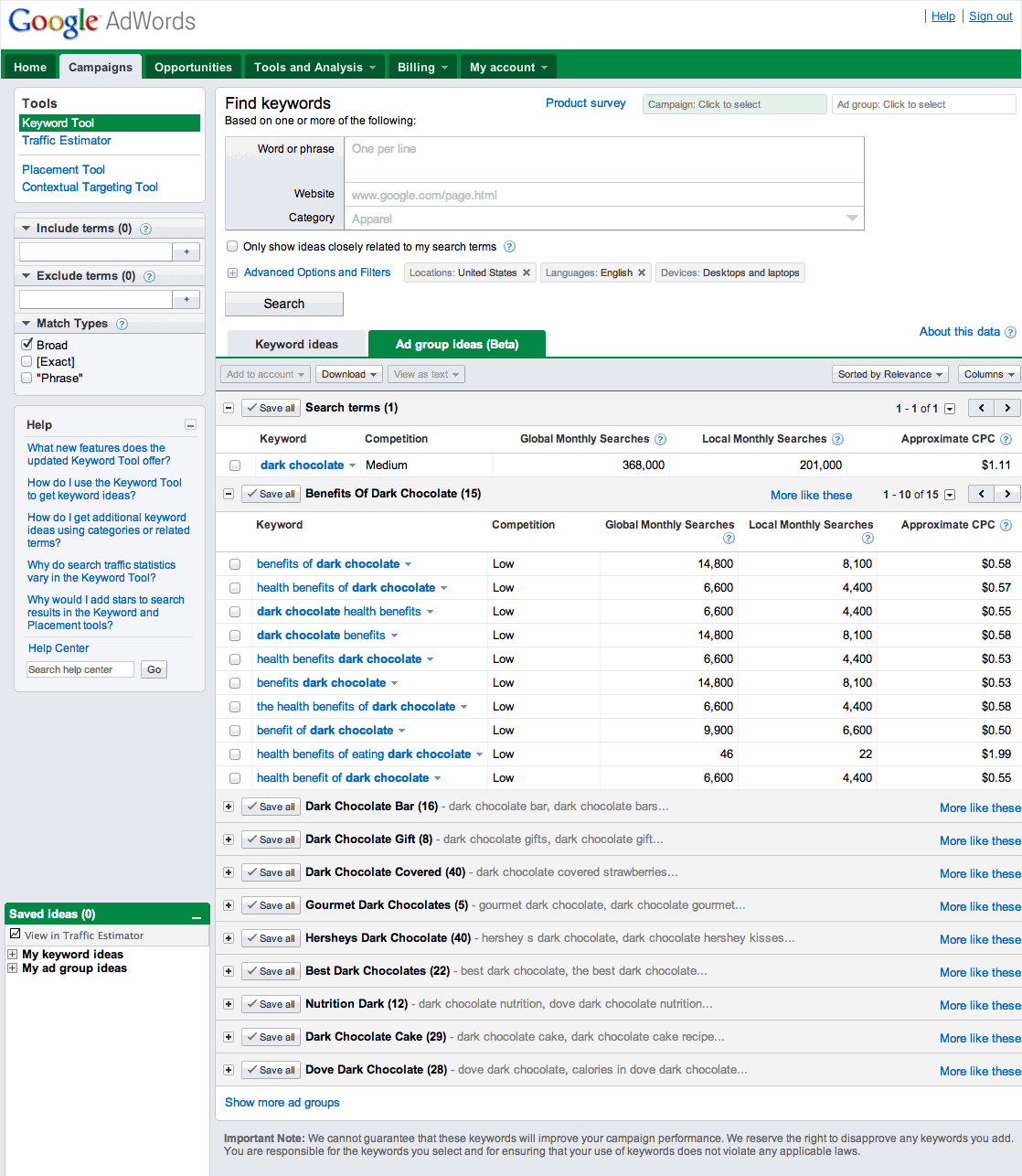
Keyword Tool
See ad group ideas - To add the ad groups you like to your account, click the Save all button next to each ad group name. Keep in mind that we'll add your ad groups to the "My ad group ideas" list that's in the "Saved ideas" box next to the results table at the bottom of your browser.
Keyword Tool
See Save all button - Click the Add to account drop-down menu and select "My ad group ideas." In the "Add to account" window that appears, select the campaign that you'd like to save your ad groups to from the "Select a campaign" menu. Click Add to account.
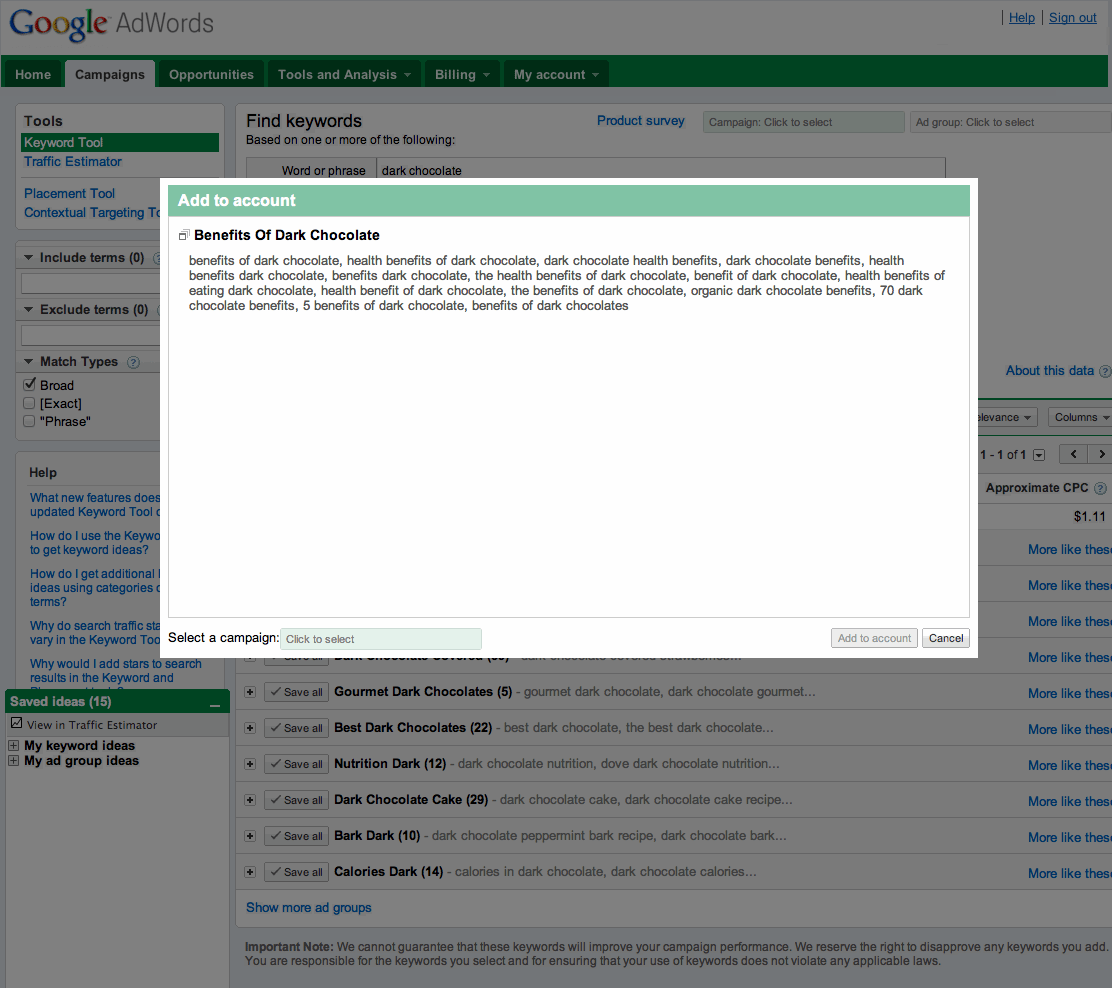
Keyword Tool
Add ad group ideas
Tip
To see ad group ideas similar to ones that you like, click the More like these link. You'll see a new list of ad group ideas in the results table. When you click the More like these link, your original ideas won't appear in the results table anymore. Before you get similar ad group ideas, click the Save all button next to the original ideas that you'd like to save. Let's say you'd like to see keyword ideas that aren't grouped into themed ad groups. Then using the Keyword Ideas tab is for you. You can see individual keywords, review statistics for each keyword, and then add the ones that you like to your account.
Here's how to use the Keyword Ideas tab:
Here's how to use the Keyword Ideas tab:
- Click the Keyword Ideas tab if you're not already on it. You'll see a list of the keywords and statistics for each keyword, like the approximate cost-per-click (CPC) data, in the results table.

Keyword Tool
See keyword ideas - To add the keywords you like to your account, select the checkbox next to each keyword. Keep in mind that we'll add your keyword ideas to the "My keyword ideas" list that's in the "Saved ideas" box next to the results table at the bottom of your browser.
- Click the Add to account drop-down menu and select "My keyword ideas". In the new window that appears, select the campaign and ad group where you'd like to add your keywords. Click Save and continue.

Keyword Tool
Add keyword ideas
Tip
To see keyword ideas similar to ones that you like, click the drop-down menu next to that keyword and select "Show more like this". You'll see a new list of keyword ideas in the results table. When you select "Show more like this", your original ideas won't appear in the results table anymore. Before you get similar keyword ideas, select the checkbox next to the original ideas that you'd like to save. Let's say you've searched for keyword ideas, and you'd like to modify your results to see ideas for desktop and laptop computers, or phrase match keywords, for example. You can refine your results in a variety of ways for both the Ad Group Ideas and Keyword Ideas tabs.
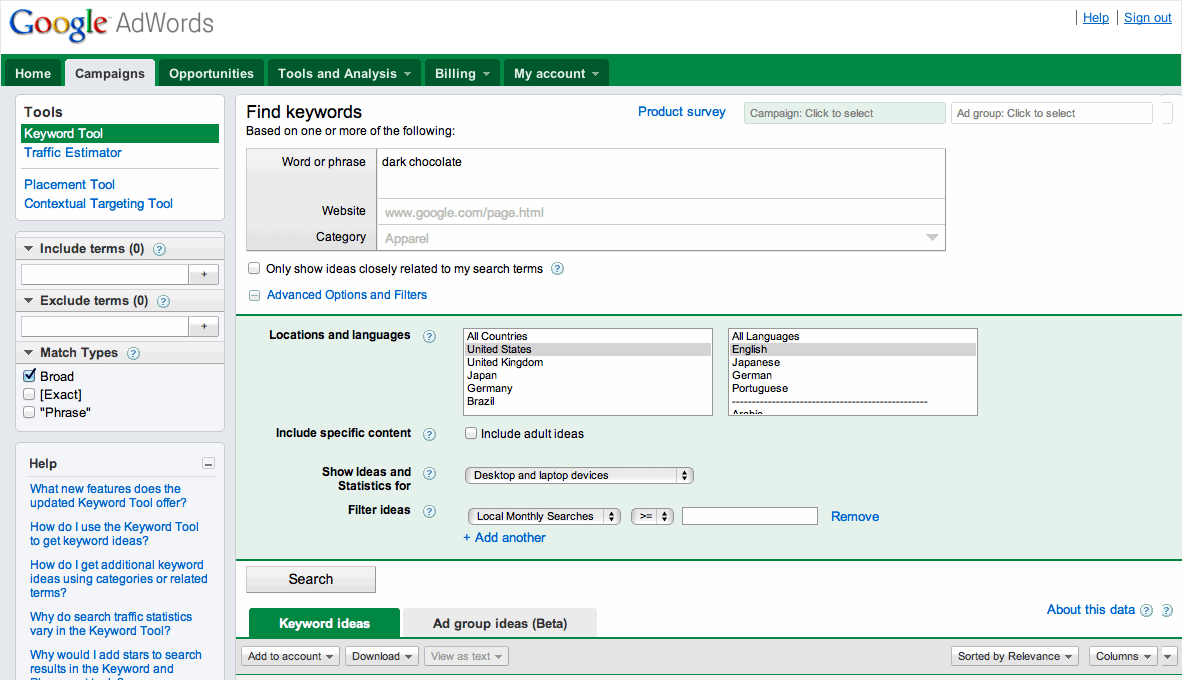
To see your results with multiple match type, select or deselect the checkboxes next to the match types to see results for the ones you choose. For example, you might want to compare statistics for the broad match and phrase match versions of your keyword results, so you'd select the Broad and "Phrase" checkboxes.
To customize your table to see different columns, click the Columns drop-down menu and select the checkboxes next to the data you'd like to see in your table. Click Apply to update your table.
Target and filter your keyword results
You can refine your results further by clicking the Advanced Options and Filters link. Then, you can select the following options:- Locations and languages: Choose specific countries and languages to see keyword ideas for your selections. For example, you can see keyword ideas for French-speaking customers in Switzerland.
- Devices: To see placement ideas for specific devices, such as mobile devices with full Internet browsers or mobile WAP devices, select a device from the Show Ideas and Statistics for drop-down menu.
- Filter ideas: You can filter your results by overall searches on Google (global monthly searches), searches performed in the country you've selected to target (local monthly searches), approximate CPC, and competition types. Select the Filter ideas drop-down menu. "Local Monthly Searches" will be the default option, so choose how you'd like to refine your results.
Keyword Tool
See advanced options and filtersSort your results
We'll automatically sort your keyword ideas by relevance. However, you might want to see keyword ideas that have the most global monthly searches, or maybe those results with high competition. Here's how you can sort your results by different criteria:- Click the Sorted by Relevance drop-down menu and select how you'd like to sort your results. Your results will then be resorted.
- To sort your keyword results in descending order, click the column header of the statistic you'd like to sort by. Click the column header again to sort your results in ascending order.
Include or exclude ideas
Here's how you can include or exclude certain terms from your keyword results.- Include terms: In the Include terms box, enter keywords and click the + button. Your results will be updated to include only keyword ideas that contain at least one of the terms you added. If you don't include quotes around your keywords, you'll see ideas that include both terms, but not necessarily those terms only, in any order. If you use quotation marks around your keywords, you'll see keyword ideas that contain both terms in the order you added them.
Keyword Tool
See Include terms box - Exclude terms: In the Exclude terms box, enter keywords and click the + button. Your results will be updated with keyword ideas that don't include any of the terms you added.
Keyword Tool
See Exclude terms box
Use keyword matching
When you search for keyword ideas, we'll automatically show you results for broad match keywords. You can see your results as broad match, exact match, or phrase match, which will allow you to compare statistics for keywords with multiple match types at the same time.To see your results with multiple match type, select or deselect the checkboxes next to the match types to see results for the ones you choose. For example, you might want to compare statistics for the broad match and phrase match versions of your keyword results, so you'd select the Broad and "Phrase" checkboxes.
Customize your table
Before you make your final choices, you can use the columns in your table to compare keyword performance statistics. We'll show you competition, global monthly searches, local monthly searches, and approximate cost-per-click (CPC) for Google search data by default.To customize your table to see different columns, click the Columns drop-down menu and select the checkboxes next to the data you'd like to see in your table. Click Apply to update your table.


COMMENTS